Why Cursor Keeps Hallucinating Your Code (And What Actually Stops It)
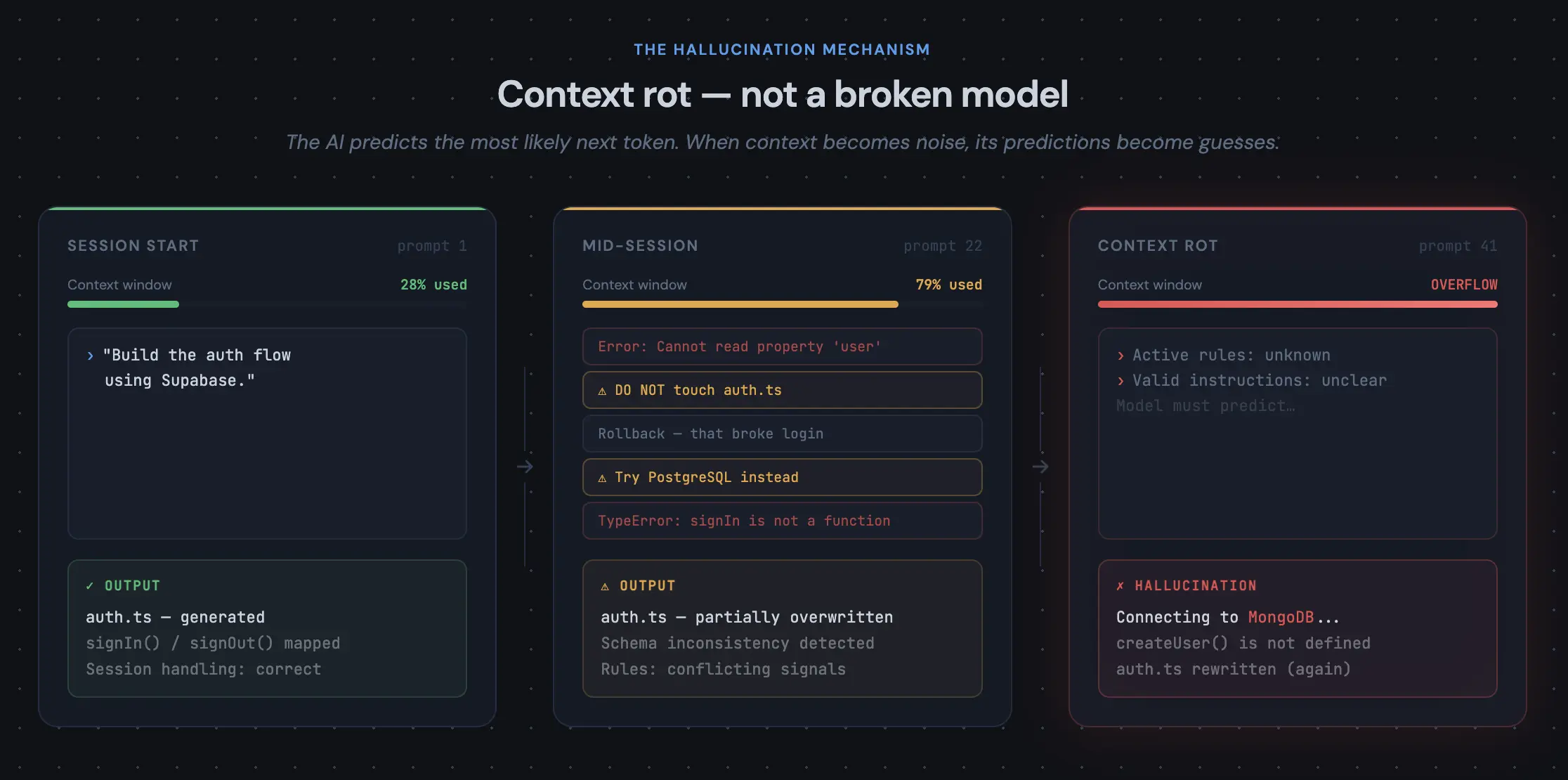
TL;DR: When Cursor rewrites working code or invents variables, the model is usually reacting to a polluted context window—not broken AI—and you fix it by shrinking scope, resetting context, and anchoring the agent to a written spec.
You just started a new project in Cursor. The first few prompts felt like magic. You used Composer to create a dashboard, and it looks good. Later, you ask for a simple CSS tweak, and the agent quietly rewrote your entire database schema, imported a library you didn't ask for, and broke the authentication flow.
The community calls this the "80% wall." You spend the first half of your project building, and the second half fighting the AI to stop it from undoing your work. When Cursor starts hallucinating variables or making up file paths, the instinct is to blame the model. But the model isn't the problem. The problem is context rot.
The Anatomy of a Cursor Hallucination
Large Language Models (LLMs) are prediction engines. They predict the most logical next line of code based on the context they currently hold in their working memory. When you start a new project, your context window is clean. But after forty back-and-forth prompts, three failed debugging attempts, and a dozen pasted error logs, the context window becomes a mess. The AI can no longer distinguish which instructions are active rules and which are discarded experiments.
When Cursor loses track of your system's boundaries, it starts guessing. It assumes you are using MongoDB when you are on Postgres, invents a component that doesn't exist, and conveniently "forgets" a structural decision you locked down twenty prompts ago. This is the classic AI hallucination syndrome.
The Flawed Fix: "Yelling" in the Prompt
When the AI starts drifting, most builders try to micromanage it. They start writing prompts in all caps: "DO NOT TOUCH the auth.ts file", "ONLY update the styling", "REMEMBER we are using Supabase".
This is a losing battle. You're relying on the AI to remember the entire architectural state of the app through conversational memory, which is exactly what's actively failing.
The Real Fix: The Permanent Anchor
To stop Cursor from hallucinating, you have to stop relying on conversational memory. The AI needs a fixed, permanent anchor, a source of truth that exists outside the chat window. In traditional engineering, we call this a spec document. In vibe coding, it’s an Architecture Design Document (ADD) and a strict, phased execution plan.
If you want Cursor to execute perfectly on day three, day ten, or day thirty, your workflow should look like this:
- Define the boundaries upfront: Lock in your data schemas, routing logic, and tech stack in a single master document before you begin coding.
- Anchor the context: Keep your architecture spec in a markdown file (e.g.,
architecture.md) in your root directory. Tag it in every major Composer session so the AI references the master plan instead of guessing. - Build in isolated phases: Never ask Cursor to "build an app that does ..." Ask it to "execute Phase 2: Database Setup" based on the parameters in your master document.
When you constrain the AI's attention budget to a solid blueprint, it stops hallucinating because it no longer has to guess.
How to Generate the Blueprint
Most founders and fast-moving vibe coders don't think about writing a thorough architecture spec from scratch. It requires spending a lot of time planning and thinking through trade-offs before starting.
The tool built for exactly this workflow is Zalcro. You describe your idea, and Zalcro asks the clarifying questions needed to nail down your boundaries. It automatically generates a complete Architecture Design Document, a visual system diagram, and a sequenced pack of execution prompts.
The MCP integration makes it stick in Cursor specifically. Your agent reads the blueprint directly, every session, without you pasting context into the chat window. The rules are always there and the boundaries don’t drift.
The hallucinations won't stop because the model got smarter. They stop because it doesn't have to guess.