How to Plan an App Before Building with Bolt.new
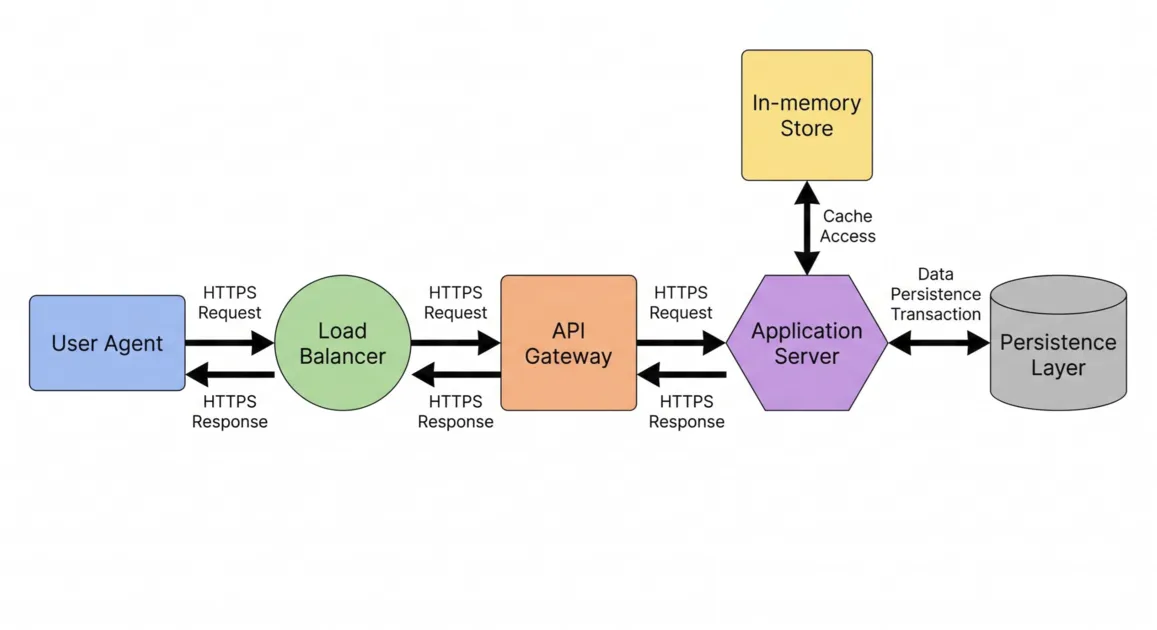
TL;DR: Before you fire up Bolt.new, you need to lock down your requirements, architecture, data relationships, and build sequence. Bolt's Plan Mode is great for discussing approaches, but Zalcro takes pre-build planning to the next level. It turns your raw idea into a connected Architecture Design Document, a system diagram, and a phased Prompt Pack built specifically for Bolt.new. You get the complete blueprint and copy-paste ready build instructions before you write a single line of code.
Bolt.new makes it possible to turn a description into a working application directly in your browser. That's exciting when you're starting with an idea. But building an entire app involves more than generating the first few screens.
Your database, authentication, user permissions, payments, and application features all need to work together. If you get your database relationships or permissions wrong on day one, you'll be untangling code for weeks. A solid plan forces you to make those decisions before they get permanently baked into your codebase.
Here’s how to map out your app for Bolt.new, organize the build into logical phases, and use Zalcro to generate the exact architecture and prompts you need to pull it off.
What should you plan before using Bolt.new?
Before writing your first build prompt, establish five things:
- App requirements: What the app does, who uses it, and which features belong in the first version.
- User flows: What users can do, from signing up to completing the app's main task.
- Architecture: How the frontend, database, authentication, and external services will work together.
- Data and permissions: What information the app stores, how records relate, and who can access them.
- Implementation order: Which features depend on others and what should be verified before moving forward.
These decisions form your app's blueprint. You can figure this out on a whiteboard, hash it out in Bolt's Plan Mode, or use a dedicated AI app planning tool like Zalcro to generate the entire connected architecture and implementation sequence.
How to plan a Bolt.new app in five steps
Step 1: Define the app and its first release
Start with a plain-language description of your idea.
For example:
I want to build a social matching app where users create profiles, discover people nearby, swipe on profiles, and chat when they both express interest.
Then define what belongs in the first release.
For this example, the essentials might include accounts, profiles, swiping, matching, and messaging.
Advanced recommendations, additional subscription tiers, and other enhancements could come later.
Also clarify important rules:
- Can users message anyone, or only people they've matched with?
- Can someone see another person's exact location?
- What happens when a user blocks or unmatches someone?
- Are there limits on daily swipes?
These aren't minor details. They affect the application's data structures, permissions, and backend behavior.
Zalcro begins with a guided conversation that helps you identify these requirements and make the decisions needed to design your app.
Step 2: Create the architecture before generating code
Now you need to figure out how the application's components fit together.
For the matching app, you need:
- A frontend for the UI (profiles, swiping, chat).
- Auth and user account management.
- A database to track profiles, swipes, matches, and messages.
- Backend rules handling the matching logic and swipe limits.
- Cloud storage for profile pictures.
It’s not just about picking a tech stack. It's about deciding where the application's responsibilities live.
For example, does the browser decide if two users match, or does the backend verify it? Does the frontend filter what data a user sees, or does the database enforce strict access rules?
Bolt relies on these architectural decisions to generate the right code.
Zalcro generates an Architecture Design Document (ADD) that defines every component, data relationship, API integration, and technical constraint. It also builds a visual system diagram so you can see exactly how the pieces connect.
Step 3: Organize the build into dependency-aware phases
Once the architecture is established, decide what to build first.
It's tempting to ask Bolt to generate the entire application in one prompt. But a phased implementation plan makes the work easier to follow and verify.
For our matching app, an example sequence could be:
| Phase | What to build | What to verify |
|---|---|---|
| 1 | Project setup and app structure | Application starts and navigation works |
| 2 | Authentication and user accounts | Users can sign in and access their accounts |
| 3 | Database tables and access rules | Data relationships and permissions work |
| 4 | Profiles and photo uploads | Users can create and edit their own profiles |
| 5 | Discovery, swiping, and matching | Matching rules work as specified |
| 6 | Messaging | Only eligible users can exchange messages |
The exact order depends on your architecture. You can't build messaging until you have user accounts and matching logic working.
This is called dependency-aware implementation planning. It's a key part of a phased implementation plan.
Zalcro automatically generates this build sequence from the architecture, then turns the phases into platform-specific instructions. For Bolt.new, those instructions are delivered as a Prompt Pack.
Step 4: Generate a Bolt-specific Prompt Pack
This is where Zalcro turns an application blueprint into something you can use directly.
A Prompt Pack is a sequenced list of prompts tailored to an AI app builder. Instead of guessing what to ask Bolt next, you get an ordered set of instructions derived from your architectural decisions. Every prompt tells Bolt exactly what to build in that phase, provides the necessary technical context, and tells you what to verify before moving on.
For example, a phase for implementing user profiles can refer to the data structures and permissions already established in the architecture. Later prompts can build on those decisions when adding discovery, matching, or messaging.
It changes the entire workflow: One app blueprint → one dependency-aware build sequence → copy-paste implementation prompts. You can review the instructions before implementation, follow them in order, and verify each stage as you build.
With Zalcro's free Starter tier, you can generate the architecture, diagram, and initial build instructions. The Builder tier unlocks the complete Prompt Pack.
Step 5: Build in Bolt.new and verify each phase
With your blueprint and Prompt Pack ready, open Bolt.new. Start with the first prompt from Zalcro's Prompt Pack. Review what Bolt generates and test the required functionality before moving to the next prompt.
For example, if you've just implemented authentication, verify that users can sign in and that protected areas aren't accessible without authorization.
Once the phase is complete, save a working version and continue to the next prompt.
Bolt's Plan Mode is highly useful here. You can use it to discuss Zalcro's next prompt and review how Bolt plans to approach it before you switch to Build Mode and change the code.
If you hit a wall, jump back into your Zalcro project. Since Zalcro retains the context of your original architecture, you can use the chat to troubleshoot bugs or clarify instructions.
A real example: Aura, planned for Bolt.new with Zalcro
Aura is a social matching app concept planned in Zalcro specifically for Bolt.new. It includes profiles, location-based discovery, swiping, mutual matches, chat, and premium subscriptions.
Rather than beginning with a broad request to build a dating app, Zalcro generated a detailed architecture covering the application's responsibilities and data relationships.
The architecture uses Supabase for authentication, PostgreSQL data storage, and access controls. It also defines where matching and location-filtering logic should run.
Zalcro then generated a 10-phase Bolt.new Prompt Pack, covering project setup, authentication, database rules, onboarding, profiles, discovery, messaging, payments, account deletion, and pre-launch checks.
The important point is that the prompts are derived from the same architecture. You can inspect the actual planning output, including the Architecture Design Document, system diagram, and Prompt Pack.
Explore the Aura app blueprint and Bolt.new Prompt Pack
Bolt.new Plan Mode vs. Zalcro: what's the difference?
Bolt.new includes Plan Mode, which allows you to discuss requirements, explore approaches, and prepare implementation plans before making code changes. It's especially useful for planning and refining work inside the Bolt environment.
Zalcro provides a dedicated planning workflow before you begin building. It guides you through requirements, produces a connected Architecture Design Document and system diagram, and generates the full sequence of implementation prompts tailored to Bolt.
The distinction is about the planning workflow and the deliverables.
| Zalcro | Bolt.new Plan Mode | |
|---|---|---|
| Primary role | Dedicated app architecture and pre-build planning | Planning within the Bolt development environment |
| Architecture output | Connected ADD and system diagram | Can propose architecture and implementation approaches |
| Build instructions | Phased, dependency-aware Bolt Prompt Pack | Plans that can be implemented through Bolt |
| Planning context | Saved project architecture and versioned plans | Context from the Bolt project and conversations |
| Working across builders | Planning outputs for Bolt, Lovable, Replit, and coding agents | Designed for the Bolt development workflow |
You don't have to choose one or the other. Zalcro establishes the overall architecture and prepares the build sequence. Bolt Plan Mode can help refine individual implementation steps before Bolt generates the code.
For a more detailed comparison, read Zalcro vs. Bolt.new.
Frequently asked questions
Should I plan my app before using Bolt.new?
Yes. Establishing your requirements, data relationships, permissions, and implementation order gives Bolt a clearer foundation for generating the application. Zalcro can create the architecture, diagram, and sequential prompts before you start.
Does Bolt.new have a planning mode?
Yes. Bolt.new Plan Mode lets you discuss requirements and implementation approaches without making code changes to an existing project. You can review a plan before asking Bolt to implement it.
Can Zalcro generate prompts specifically for Bolt.new?
Yes. Zalcro generates a Bolt-specific Prompt Pack based on your application's architecture. The prompts are organized into implementation phases and designed to be pasted into Bolt in sequence.
Can I use Zalcro without knowing how to code?
Yes. You describe your idea in plain language and answer guided questions. Zalcro handles the technical planning and generates instructions for Bolt.new, which performs the implementation.
What's the difference between a Bolt prompt and a Prompt Pack?
A Bolt prompt is an instruction you send to the builder. A Zalcro Prompt Pack is a coordinated sequence of prompts generated from an application blueprint. Each phase has a defined scope and follows the application's implementation dependencies.
Plan your app with Zalcro. Build it with Bolt.new.
Bolt.new gives you the ability to turn an idea into working software quickly.
Zalcro gives you the architecture and implementation instructions to guide that work from the beginning.
Instead of starting with a vague request and deciding how the pieces fit together as you go, start with a connected blueprint, a system diagram, and a Bolt-specific Prompt Pack.
Zalcro plans your app. Bolt.new builds it.
Zalcro generates your Bolt.new architecture, system diagram, and phased Prompt Pack before your first build prompt.