Confused by Vibecoding? Start Here.
You've seen the demos. Your friend built a full app in one afternoon. They described what they wanted, and the AI built it. You want to do that, but you don't even know where to start.
Which tool do you use? Lovable? Cursor? Bolt? Replit? Do you need to learn python? Or how to code at all? And why does everyone keep saying "spec" and "context"?
This guide is for you. Not for developers who already know what they're doing. For the person who has an idea, has heard of vibecoding, and has no idea where to begin.
First: what is vibecoding, actually?
Vibecoding is building software by describing what you want in plain language, and letting an AI write the code. You direct, the AI builds.
It isn’t foolproof magic, but for moderately complex apps—dashboards, internal tools, SaaS MVPs, browser extensions, it works surprisingly well.
The "vibe" part is real. You're working by feel, iterating, adjusting. It's less like programming and more like directing a very fast, very literal intern.
What you'll need
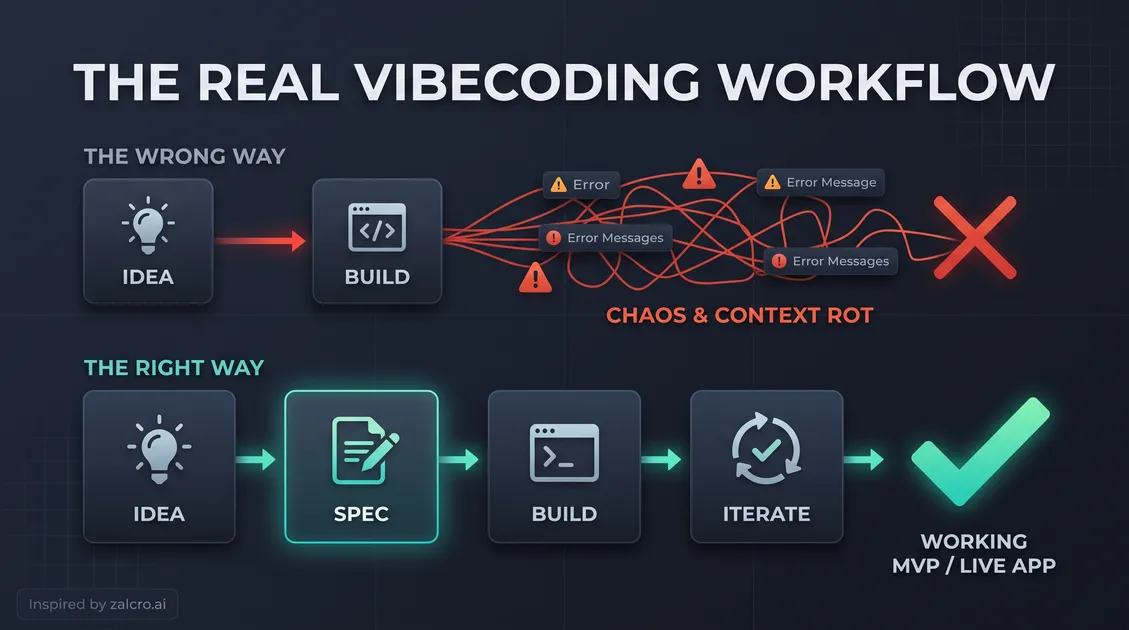
Here's what goes into a vibecoded project, in the order you'll encounter it:
1. An idea: What you want to build.
2. A spec: A written description of your idea with enough detail that the AI can work from it. Not a novel. A clear, structured document that covers what the app does, who uses it, and how the core flows work. (This is the step most beginners skip. We'll come back to it.)
3. A building tool: The AI platform where the actual coding happens.
4. Iteration: A back-and-forth process of testing, breaking things, and fixing them.
Step 1: Know what you're building before you start
This sounds obvious, but it's the step most people skip. They go straight to a building tool (Lovable, Cursor, Bolt) and just type their idea in. The AI creates something, but it's not quite right. So they adjust, then adjust again. Within an hour they've got a mess of half-built features and they're starting over.
The problem isn't the tool. The problem is that they never had a clear enough idea to build from. So, before you open any builder, write down:
- What is this? One sentence. What does the app do?
- Who uses it? One type of person. What do they want?
- What are the 3–5 core things the app must do? List them.
- What does the app look like? Rough sketches, screenshots of apps you like, a few words about the vibe.
- What does it not do? This one is underrated. Scope creep kills MVPs.
We'll call that the spec for your build. It doesn't have to be perfect. It just has to exist.
Step 2: Choose a building tool
The tools are genuinely different. Here's a simple breakdown:
Lovable is the most beginner-friendly. You describe what you want, it builds a React app, and you can see it live instantly. Great for web apps with a UI. No coding knowledge required.
Bolt.new is fast and flexible, built on StackBlitz. Good for quick prototypes. Also very beginner-accessible.
Replit is more developer-oriented but has a generous free tier and good AI integration. Good if you want to eventually look at the code.
Cursor is a code editor with AI built in. Powerful, but assumes you're comfortable with code. Not the right starting point if you've never touched a codebase.
Claude Code is an agentic coding tool. Powerful for multi-file tasks and complex builds, but it assumes you’re already comfortable in a development environment. Not for beginners.
v0 by Vercel is specifically for UI components. If you want to design and prototype interfaces, it's excellent. Not a full app builder.
If you've never built anything before: start with Lovable or Bolt. Both require zero coding knowledge and produce real, deployable apps.
Step 3: Write a prompt, not a wish
When beginners sit down, they usually type something like, "Build me a habit tracker app." That’s not a prompt, that's a wish.
You need to constrain the AI. Tell it to build a habit tracker web app with daily habits (name + optional description), a 7-day streak count, and a simple white UI, explicitly stating no user accounts yet. Being specifics will keep the AI on a leash.
If you've written a spec (Step 1), your first prompt is basically describing a summary of it.
Step 4: Iterate, don't panic
The first thing the AI builds will not be exactly right. That's normal.
Your job now is to test it, find what's wrong, and describe the fix. Treat each change like a direction you're giving a team member:
- "The button doesn't do anything when I click it. It should add the habit to the list."
- "The streak count is showing the wrong number. It should reset to 0 if I miss a day."
- "The font is too small. Make it larger."
Expect up to 30–40 back-and-forths before an MVP is solid. That's the process, get used to it.
The part most people skip (and why it matters)
This is what breaks most vibecoded projects: AI has a memory limit.
As you add features, its "context window" fills up and it starts forgetting earlier decisions. Code contradicts itself. New features break old ones. The AI starts apologizing and rewriting things you already fixed.
We call this context rot, and it's why most projects fall apart on day two.
The fix is architectural planning before you build. A structured document that the AI can reference at each step—covering your data model, key flows, and constraints, keeps the AI coherent across a long build.
This is why we built Zalcro. Instead of guessing, you use Zalcro to turn your idea into a structured plan in about 10 minutes. You take that document, paste it directly into a tool like Lovable, and go into your first build with a real plan.
What you don't need
You do not need to:
- Learn to code to vibecode (though it helps with debugging)
- Pay for expensive tools to start (Lovable, Bolt, and Replit all have free tiers)
- Know how databases work before you start (you'll learn as you go)
- Have a perfect idea before you start (building reveals what you actually need)
The barrier is lower than it looks.
The real differentiator
The differentiator between a successful build and a frustrating one isn't technical skill, picking the perfect tool, or knowing secret prompts.
It's clarity of thought.
The AI will build what you describe. Your job is to describe it well. Start with your spec, be specific, and iterate patiently. You'll have something to show people by the end of the week.
Ready to start? Zalcro turns your idea into a structured plan in minutes, so you build with a plan, not a wish.